
Consistency Scores
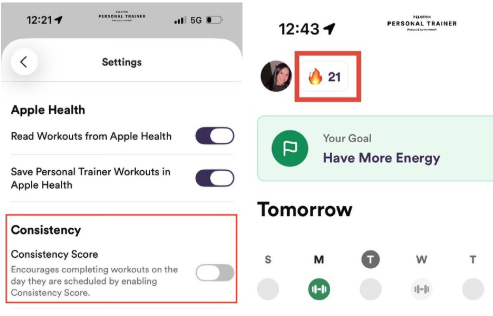
Our Consistency Score feature encourages you to complete workouts on the day they are scheduled! To disable the Consistency Score feature, go to Profile > Settings > Consistency.
Consistency Score Overview
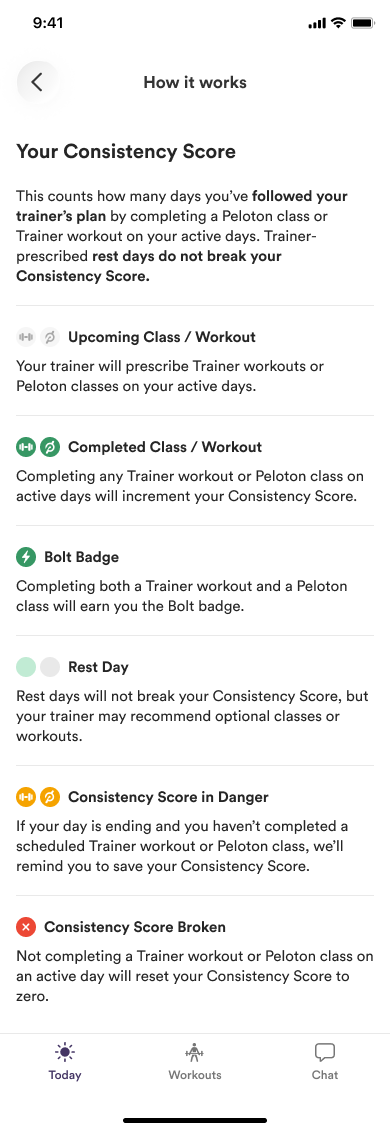
Counts how many days you've followed your trainer's plan
Completing a Peloton class OR a Trainer workout on active days will count toward your score
Trainer prescribed rest days do not break your Consistency Score
Consistency Score ON - tap on the Fire Icon to view more info
Pushes you to complete your workouts on the days they're prescribed. This is good if you need an extra push to get workouts or classes done.
Missed workout/class days are red and upcoming workout days are gray.
Consistency Score is enabled and visible.
Consistency Score OFF
Gives you flexibility to complete your workouts/classes on whichever days you want. This is good if you're already very consistent with workouts on a weekly basis or have an adverse response to streaks.
Both missed and upcoming workout days are gray.
Consistency Score is disabled and hidden.
Note: In both modes, you can move both Peloton and trainer workouts within 7 days. See our Move Workouts help article here!